The Epson WorkForce ES-50 Portable Document Scanner is a compact, fast, and highly portable solution for digitizing physical documents on the go, weighing just under 0.6 pounds (270 grams) and scanning a standard page in 5.5 seconds at 300 dpi. It operates via USB power, eliminating the need for external adapters, and includes Epson ScanSmart software with Nuance OCR for searchable PDFs and editable files. This makes it ideal for remote professionals, students, and business travelers needing a reliable mobile scanning solution.
The Epson WorkForce ES-50: A Closer Look
The Epson WorkForce ES-50 distinguishes itself as one of the fastest and lightest mobile single-sheet-fed document scanners available. Designed with the mobile user in mind, it provides essential scanning functionalities in a form factor that easily slips into a backpack or briefcase.
Unmatched Portability and Design
Weighing in at just under 0.6 pounds (270 grams) and featuring a minimal footprint, the ES-50 redefines what it means for a scanner to be portable. Its slim, minimalist design is functional, blending seamlessly into any mobile workspace. A significant advantage for professionals on the move is its USB-powered operation. It draws power directly from your laptop or computer via a standard USB 2.0 (Micro-B) cable, eliminating the need for cumbersome external power adapters or batteries. This plug-and-play convenience means true mobility, allowing you to scan virtually anywhere your laptop can go. For see our document scanners recommendations on this site.
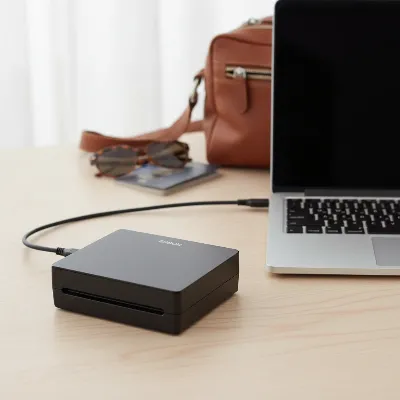 Epson WorkForce ES-50 portable scanner illustrating its compact design and USB connectivity
Efficient Scanning Performance
Despite its small stature, the ES-50 delivers impressive speed for single-sheet scanning. It can digitize a standard letter or A4-sized page in as fast as 5.5 seconds at 300 dpi. While it’s a single-sheet-fed scanner, its “Automatic Feeding Mode” allows continuous feeding of pages, saving them into a single file without needing to click through menus for each scan. This feature is particularly useful for digitizing multi-page documents one after another.
The scanner’s versatility in handling various media types is another strong point. It supports documents up to 8.5 x 72 inches, making it suitable for extra-long legal documents, banners, or lengthy receipts. It can effortlessly scan various paper weights, from thin office sheets (35 gsm) to thicker card stock (270 gsm), and even laminated ID cards or embossed plastic cards up to 1.2mm thick. The optical resolution reaches 600 x 600 dpi, with an output resolution up to 1200 dpi (interpolated), ensuring crisp text and clear image reproduction for both color and black-and-white documents.
Smart Software and Productivity Features
|
Our Picks for the Best Document Scanner in 2026
As an Amazon Associate I earn from qualifying purchases.
|
||
| Num | Product | Action |
|---|---|---|
| 1 | Epson WorkForce ES-50 Portable Sheet-Fed Document Scanner for PC and Mac |

|
| 2 | Epson Workforce ES-C220 Compact Desktop Document Scanner with 2-Sided Scanning and Auto Feeder (ADF) for PC as Well as Mac |
|
| 3 | ScanSnap iX2500 Wireless or USB High-Speed Cloud Enabled Document, Photo & Receipt Scanner with Large 5" Touchscreen and 100 Page Auto Document Feeder for Mac or PC, White |
|
| 4 | Doxie Pro DX400 - Duplex Document Scanner and Receipt Scanner For Home and Office With Amazing Software for Mac and PC |
|
| 5 | Canon imageFORMULA R40 Office Document Scanner Receipt Edition, for PC and Mac, Scan & Extract Data to QuickBooks Online, Color Duplex Scanning, Auto Document Feeder, Easy Setup for Office Or Home Use |
|
| 6 | ScanSnap iX1300 Compact Wireless or USB Double-Sided Color Document, Photo & Receipt Scanner with Auto Document Feeder and Manual Feeder for Mac or PC, Black |
|
| 7 | ScanSnap iX2500 Wireless or USB High-Speed Cloud Enabled Document, Photo & Receipt Scanner with Large 5" Touchscreen and 100 Page Auto Document Feeder for Mac or PC, Black |
|
| 8 | Brother DS-640 Compact Mobile Document Scanner, (Model: DS640) 1.5"x2"x11.9" |
|
| 9 | Canon imageFORMULA R10 - Portable Document Scanner, USB Powered, Duplex Scanning, Document Feeder, Easy Setup, Convenient, Perfect for Mobile Users |
|
| 10 | ScanSnap iX1300 Compact Wireless or USB Double-Sided Color Document, Photo & Receipt Scanner with Auto Document Feeder and Manual Feeder for Mac or PC, White |
|
The Epson WorkForce ES-50 comes bundled with the intuitive Epson ScanSmart software, which streamlines the scanning, reviewing, and saving process. This software offers simple steps to capture documents, make quick adjustments, and save files in various formats like JPEG, PDF (including searchable PDFs), DOCX, XLSX, and PPTX.
A standout feature is the inclusion of Nuance Optical Character Recognition (OCR) technology. This powerful tool converts scanned documents into fully searchable PDFs or editable Microsoft Word and Excel files, transforming static images into actionable data. For those who rely on cloud storage, the ScanSmart software also supports direct scanning to popular cloud services, simplifying file management and accessibility from anywhere with an internet connection.
Connectivity and System Compatibility
Connectivity for the ES-50 is straightforward: it connects to your computer via a high-speed USB 2.0 port. While it lacks built-in Wi-Fi or network capabilities, this direct connection ensures reliable data transfer without relying on wireless signals. The scanner is compatible with both Windows and Mac operating systems, and it includes a TWAIN driver, allowing it to work seamlessly with a wide range of imaging software you might already be using.
Key Advantages of the ES-50
The Epson WorkForce ES-50 shines in several key areas that make it a compelling choice for its target audience:
- Ultra-Portability: Its incredibly lightweight and compact design, combined with USB power, makes it an ideal travel companion.
- Fast Single-Page Scans: Quick digitization of individual documents saves valuable time during busy schedules.
- Versatile Media Handling: From long receipts to ID cards and varying paper thicknesses, it handles diverse document types with ease.
- Powerful Software Suite: Epson ScanSmart simplifies the workflow, while Nuance OCR adds significant value by creating searchable and editable files.
- Ease of Use: A single-button operation and intuitive software ensure a hassle-free scanning experience for users of all technical levels.
Potential Considerations
While the ES-50 excels in portability and ease of use, it’s important to acknowledge its design limitations for specific use cases. As a single-sheet-fed scanner, it does not feature an Automatic Document Feeder (ADF) for batch scanning of multiple pages automatically, nor does it support automatic duplex (two-sided) scanning without manual intervention. For users who frequently need to scan large stacks of multi-page, double-sided documents, a more robust office scanner with ADF and duplexing capabilities would be more efficient. The absence of built-in Wi-Fi means you’ll always need a direct USB connection to a computer for scanning.
Who is the Epson ES-50 For?
The Epson WorkForce ES-50 is perfectly suited for individuals and small businesses prioritizing mobility and simplicity in their document management.
- Mobile Professionals and Business Travelers: For scanning expense receipts, contracts, or business cards on the road.
- Remote Workers and Home Office Users: To digitize occasional documents without dedicating significant desk space to a larger scanner.
- Students: For archiving lecture notes, handouts, or research materials.
- Anyone Needing Quick, Occasional Scans: It’s an excellent choice for digitizing paper clutter one document at a time efficiently.
Epson WorkForce ES-50 vs. The Competition
When comparing the ES-50 to other portable scanners, it often stands out for its unique blend of speed, extreme lightness, and robust software, particularly the inclusion of Nuance OCR. While some competitors like the Brother DS-640 offer similar portability, they might differ in specific features like scan speed or included software. More advanced portable models like the Epson ES-60W or certain ScanSnap models might offer wireless connectivity or slightly faster speeds but often come at a higher price point or with a slightly larger footprint. The ES-50 remains a top contender for those whose primary need is ultra-portability and direct USB functionality with excellent software.
> “A portable document scanner like the Epson ES-50 is a major upgrade for anyone constantly on the move, transforming physical paper into easily manageable digital files instantly.”
Maximizing Your ES-50 Experience
To get the most out of your Epson WorkForce ES-50, consider these tips:
- Keep the software updated: Regularly check for updates to Epson ScanSmart to ensure optimal performance and access to the latest features.
- Organize your digital files: Utilize the cloud integration features and searchable PDF capabilities to keep your scanned documents neatly organized and easily retrievable.
- Clean regularly: A quick wipe of the scanning glass and feed rollers with a soft, dry cloth can prevent dust and smudges from affecting scan quality.
- Practice with various documents: Get familiar with how the scanner handles different paper types and sizes to ensure smooth operation during critical scanning tasks.
Conclusion
The Epson WorkForce ES-50 Portable Document Scanner continues to be an excellent choice for those seeking an ultra-compact, lightweight, and efficient solution for on-the-go document digitization. Its fast scanning speeds, versatile paper handling, intuitive software with powerful OCR, and simple USB-powered operation make it a standout device. While it may not replace a heavy-duty office scanner for high-volume, duplex scanning, its unparalleled portability and effectiveness for single-sheet tasks make it an indispensable tool for mobile professionals, students, and anyone looking to streamline their paper-to-digital workflow with minimal fuss. Is the freedom of scanning anywhere, anytime, worth having this compact powerhouse in your bag?
Frequently Asked Questions
Can the Epson WorkForce ES-50 scan directly to cloud services?
Yes, with the included Epson ScanSmart software installed on your connected Windows PC or Mac, you can scan documents directly to popular cloud storage services, simplifying file management and accessibility.
Does the Epson ES-50 support two-sided (duplex) scanning?
The Epson WorkForce ES-50 is a single-sheet-fed scanner and does not support automatic duplex scanning. To scan both sides of a document, you would need to manually flip the page and scan the second side, then use the software to combine them into a single file.
Frequently Asked Questions
What are the key advantages of the Epson WorkForce ES-50 portable scanner?
The Epson WorkForce ES-50 offers ultra-portability, fast single-page scans (5.5 seconds at 300 dpi), versatile media handling for documents up to 8.5 x 72 inches, and a powerful software suite including Epson ScanSmart with Nuance OCR for searchable and editable files. Its USB-powered operation also enhances mobility.
Can the Epson WorkForce ES-50 scan directly to cloud services?
Yes, with the included Epson ScanSmart software installed on your connected Windows PC or Mac, you can scan documents directly to popular cloud storage services, simplifying file management and accessibility. This feature allows for easy sharing and backup of digitized files.
Does the Epson ES-50 support two-sided (duplex) scanning?
The Epson WorkForce ES-50 is a single-sheet-fed scanner and does not support automatic duplex scanning. To scan both sides of a document, you would need to manually flip the page and scan the second side, then use the software to combine them into a single file.
What types of documents can the Epson WorkForce ES-50 handle?
The ES-50 is highly versatile, supporting documents up to 8.5 x 72 inches, including extra-long legal documents, banners, and receipts. It can scan various paper weights from 35 gsm to 270 gsm, as well as laminated ID cards or embossed plastic cards up to 1.2mm thick.
Is the Epson WorkForce ES-50 compatible with both Windows and Mac operating systems?
Yes, the Epson WorkForce ES-50 is compatible with both Windows and Mac operating systems. It connects via a high-speed USB 2.0 port and includes a TWAIN driver, ensuring seamless integration with a wide range of imaging software.
Maximizing Your Epson ES-50 Experience
To get the most out of your Epson WorkForce ES-50 portable scanner, follow these tips for optimal performance and document management.
Regularly check for and install updates to Epson ScanSmart software. This ensures you have the latest features, bug fixes, and optimal performance from your scanner.
Utilize the cloud integration features and searchable PDF capabilities provided by the software. This helps keep your scanned documents neatly organized, easily retrievable, and accessible from anywhere.
Perform a quick wipe of the scanning glass and feed rollers with a soft, dry cloth. This simple maintenance prevents dust and smudges from affecting scan quality and ensures clear images.
Familiarize yourself with how the scanner handles different paper types and sizes. This practice ensures smooth operation and high-quality results during critical scanning tasks.
Get our weekly buyer guide
Practical specs, not advice. Unsubscribe anytime.

This scanner has been great for digitizing old receipts and documents for my home office. The Epson ScanSmart software with Nuance OCR works really well for making searchable PDFs, which saves me a ton of time when I need to find something specific. It’s a solid little machine for the price.
As a student, I’m constantly scanning notes and articles. The ES-50 is incredibly convenient because it’s so compact and fits right into my backpack. I love that I don’t need an external power adapter; just plugging it into my laptop’s USB port is all it takes. It’s made my life so much easier for keeping my study materials organized digitally.
I bought the ES-50 for scanning client documents when I’m out of the office. It’s definitely portable and lightweight, which is what I needed. My only minor complaint is that it’s a single-sheet feeder. Sometimes I wish it had a small automatic document feeder for those times I have a few pages to scan at once, but for quick, individual scans, it’s fine.
I travel a lot for work and needed something super light. The ES-50 is perfect, barely adds any weight to my bag, which is a huge plus. Scanning a page in 5.5 seconds is also really fast when I’m trying to get things done quickly between meetings. The USB power is a lifesaver, no extra cords to worry about.