For small businesses, high-speed document scanners are essential for digitizing paperwork, streamlining operations, and securing critical information. These devices, particularly those with Automatic Document Feeders (ADF), offer speeds ranging from 30 to 80+ pages per minute (PPM) and 60 to 160+ images per minute (IPM), significantly boosting productivity. Key considerations include scanning speed, resolution (DPI), ADF capacity, duplex scanning, connectivity, and included software like Optical Character Recognition (OCR).
Types of Document Scanners
Choosing the right document scanner begins with understanding the different types available and their primary applications. Each type offers distinct advantages, catering to various scanning volumes, document types, and mobility requirements that a small business might encounter. Recognizing these differences is crucial for making an informed decision that aligns with your operational demands.
Flatbed ScannersFlatbed scanners feature a flat glass surface where documents are manually placed. They are ideal for scanning delicate items, bound materials like books or magazines, and irregular-sized documents that cannot be fed through an automatic mechanism. While offering superior image quality for such items, their manual operation makes them significantly slower for multi-page documents. For compare top document scanners on this site.
Automatic Document Feeder (ADF) ScannersAlso known as sheet-fed scanners, these devices come equipped with an Automatic Document Feeder (ADF) that allows users to load a stack of papers for continuous, unattended scanning. ADF scanners are the workhorses for high-volume document digitization, offering impressive speeds and often supporting duplex scanning, which scans both sides of a page in a single pass. Most high-speed scanners fall into this category due to their efficiency.
Mobile (Portable) ScannersDesigned for on-the-go professionals or businesses with limited space, mobile scanners are compact, lightweight, and typically powered via USB or battery. While they usually have smaller ADF capacities and lower speeds than desktop ADF models, their portability offers unmatched flexibility for scanning documents away from the main office. They are perfect for receipts, invoices, or contracts scanned in the field.
Specialty ScannersBeyond the general categories, some scanners are optimized for specific tasks. For instance, receipt scanners like the Epson RapidReceipt RR-600W are designed to efficiently process and organize financial documents, often with integrated software for data extraction. Similarly, high-speed photo scanners such as the Epson FastFoto FF-680W excel at digitizing large collections of photographs, though some models can also handle standard documents effectively due to their speed.
Comparing Document Scanner Types
Understanding the differences between scanner types is key to selecting a device that truly fits your business. Here’s a comparison table highlighting key aspects to help you weigh your options.
| Feature | Flatbed Scanner | ADF (Sheet-fed) Scanner | Mobile (Portable) Scanner |
|---|---|---|---|
| Speed (PPM/IPM) | Slow (1-5 PPM) | Fast (30-80+ PPM, 60-160+ IPM) | Moderate (10-30 PPM) |
| Resolution (DPI) | High (600-1200+ DPI, excellent for photos) | Standard (600 DPI, good for documents) | Standard (600 DPI, good for documents) |
| ADF Capacity | None (manual placement) | Varies (20-100+ sheets typical) | Small (5-20 sheets typical) |
| Duplex Scanning | No (manual flip required) | Yes (standard on most models) | Often Yes |
| Best Use Case | Books, delicate items, irregular sizes | High-volume document scanning, archiving | On-the-go scanning, limited space |
| Pros | Versatile for varied media, high quality | Fast, efficient for bulk, hands-free | Compact, lightweight, battery-powered |
| Cons | Slow, manual, larger footprint | Not ideal for delicate/bound items, can jam | Lower speed/capacity, may lack features |
| Price Range | Low to Mid-Range | Mid to High-Range | Low to Mid-Range |
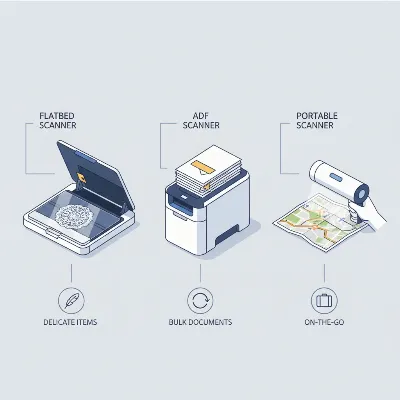 A visual comparison of different document scanner types: a flatbed, an ADF (sheet-fed), and a mobile scanner, highlighting their distinct designs and primary uses.
How to Choose a Document Scanner
|
Our Picks for the Best Document Scanner in 2026
As an Amazon Associate I earn from qualifying purchases.
|
||
| Num | Product | Action |
|---|---|---|
| 1 | ScanSnap iX2500 Wireless or USB High-Speed Cloud Enabled Document, Photo & Receipt Scanner with Large 5" Touchscreen and 100 Page Auto Document Feeder for Mac or PC, Black |

|
| 2 | Brother DS-640 Compact Mobile Document Scanner, (Model: DS640) 1.5"x2"x11.9" |
|
| 3 | Epson Workforce ES-C220 Compact Desktop Document Scanner with 2-Sided Scanning and Auto Feeder (ADF) for PC as Well as Mac |
|
| 4 | ScanSnap iX2500 Wireless or USB High-Speed Cloud Enabled Document, Photo & Receipt Scanner with Large 5" Touchscreen and 100 Page Auto Document Feeder for Mac or PC, White |
|
| 5 | Canon imageFORMULA R40 Office Document Scanner Receipt Edition, for PC and Mac, Scan & Extract Data to QuickBooks Online, Color Duplex Scanning, Auto Document Feeder, Easy Setup for Office Or Home Use |
|
| 6 | Doxie Pro DX400 - Duplex Document Scanner and Receipt Scanner For Home and Office With Amazing Software for Mac and PC |
|
| 7 | Canon imageFORMULA R10 - Portable Document Scanner, USB Powered, Duplex Scanning, Document Feeder, Easy Setup, Convenient, Perfect for Mobile Users |
|
| 8 | ScanSnap iX1300 Compact Wireless or USB Double-Sided Color Document, Photo & Receipt Scanner with Auto Document Feeder and Manual Feeder for Mac or PC, White |
|
| 9 | ScanSnap iX1300 Compact Wireless or USB Double-Sided Color Document, Photo & Receipt Scanner with Auto Document Feeder and Manual Feeder for Mac or PC, Black |
|
| 10 | Epson WorkForce ES-50 Portable Sheet-Fed Document Scanner for PC and Mac |
|
Selecting the best high-speed document scanner for your small business involves carefully evaluating your specific needs against the features offered by various models. Prioritizing these factors will help ensure you invest in a device that genuinely enhances your productivity and efficiency.
Determine Your Usage NeedsBefore diving into specifications, consider your typical scanning volume and document types. Are you digitizing dozens of invoices daily, or hundreds of multi-page contracts weekly? Do you frequently handle mixed batches of documents, such as receipts, business cards, and letter-sized papers? Understanding your workflow is the first step in narrowing down your options. Small offices might need a scanner that balances speed with a compact design, while a business handling heavy paperwork might prioritize maximum throughput and robust paper handling.
Key Factors to Consider
- Scanning Speed (PPM/IPM): This is paramount for high-speed requirements. Pages Per Minute (PPM) refers to the number of single-sided sheets scanned in one minute. Images Per Minute (IPM), often double the PPM for duplex scanners, indicates the total number of scanned sides per minute. For small businesses, speeds ranging from 30 PPM (60 IPM) to 80 PPM (160 IPM) are generally considered high-speed and efficient for most tasks.
- Resolution (DPI): Dots Per Inch (DPI) determines the clarity and detail of your scans. While 200-300 DPI is usually sufficient for text documents and OCR accuracy, 600 DPI offers better quality for documents with small fonts or images. For scanning photographs or highly detailed graphics, a resolution of 1200 DPI or higher might be desirable, though it increases file size and scanning time.
- Automatic Document Feeder (ADF) Capacity: A larger ADF capacity means fewer interruptions when scanning large batches. Capacities typically range from 20 sheets for compact models to 100 sheets or more for heavy-duty scanners. For a small business with regular scanning needs, an ADF holding 50-80 sheets is often a good balance between size and efficiency.
- Duplex Scanning: This feature allows the scanner to capture both sides of a document in a single pass, significantly reducing scanning time for double-sided papers. It is an essential feature for any high-speed document scanner aimed at improving efficiency in a small business setting.
- Connectivity Options: Modern scanners offer various ways to connect. USB 2.0 or USB 3.0 provides a direct, fast connection. Wi-Fi connectivity offers flexibility, allowing placement of the scanner anywhere within network range and shared access among multiple users without physical cables. Some professional models also offer Ethernet for robust network integration.
- Included Software and Features: Beyond basic scanning, look for software that adds value. Optical Character Recognition (OCR) is crucial for converting scanned images into editable and searchable text documents. Other useful features include automatic image enhancement (skew correction, blank page removal, auto-color detection), cloud integration (scanning directly to Dropbox, Google Drive), and compatibility with accounting software for receipt management (e.g., QuickBooks, TurboTax).
- Physical Footprint and Design: For a small business, desk space is often at a premium. Consider compact models that offer good performance without occupying too much room. Some scanners feature U-turn paper paths or can be folded for storage, optimizing space.
- Budget: Document scanners vary widely in price. While basic models start around $200-$300, high-speed, feature-rich scanners for small businesses typically range from $400 to $800 or more. Balance the cost with the features and performance you need to ensure a good return on investment.
Top High-Speed Document Scanners for Small Business
Based on speed, features, reliability, and value, several models stand out as excellent choices for small businesses seeking to digitize their documents efficiently. These scanners offer a blend of performance and practical features to handle diverse scanning tasks.
1. Brother ADS-1800W Wireless Compact Document ScannerThe Brother ADS-1800W is an excellent all-around choice for small businesses prioritizing ease of use and wireless flexibility. It offers solid performance in a compact design.
- Key Specs: Sheet-fed, 30 PPM / 60 IPM, 600 DPI, 20-sheet ADF, Duplex scanning, Wi-Fi, USB.
- Pros: Excellent build quality, intuitive 2.8-inch touchscreen for easy navigation, robust wireless connectivity, compact footprint.
- Cons: ADF capacity is somewhat low at 20 sheets, not the fastest scanner on the market.
- Ideal User: Small offices or home offices needing a reliable, user-friendly scanner with wireless capabilities for moderate daily scanning volumes.
2. Canon imageFORMULA R40 Document ScannerOften cited for its exceptional value, the Canon imageFORMULA R40 delivers impressive speed and reliability without breaking the bank. It’s a strong contender for businesses that need high performance on a tighter budget.
- Key Specs: Sheet-fed, 40 PPM / 80 IPM, 600 DPI, 60-sheet ADF, Duplex scanning, USB.
- Pros: Very fast for its price point, accurate color reproduction, easy setup. Higher ADF capacity than many competitors in its class.
- Cons: Lacks Wi-Fi connectivity and a touchscreen interface, relying on USB for connection.
- Ideal User: Small businesses looking for maximum scanning speed and ADF capacity for the money, willing to forgo wireless features.
3. Fujitsu fi-800R Document ScannerFor small businesses with higher volume demands or specific document handling needs, the Fujitsu fi-800R offers blazing speed and smart features in a remarkably compact design.
- Key Specs: Sheet-fed, 40 PPM / 80 IPM (duplex), 600 DPI, 30-sheet ADF, Duplex scanning, USB. Features U-turn and return scan paths.
- Pros: Extremely fast scanning, compact size ideal for tight spaces (like front desks), “Active Skew Correction” ensures proper alignment, handles various document types including passports.
- Cons: ADF capacity of 30 sheets may be limiting for very large batches, USB-only connectivity.
- Ideal User: Small businesses requiring very fast, high-volume scanning of diverse document types where space is a premium.
4. Epson RapidReceipt RR-600W Wireless Document ScannerThe Epson RapidReceipt RR-600W is a specialized powerhouse, perfect for small businesses, accountants, or financial professionals who frequently scan and manage receipts, invoices, and other financial documents.
- Key Specs: Sheet-fed, 35 PPM / 70 IPM, 600 DPI, 100-sheet ADF, Duplex scanning, Wi-Fi, USB.
- Pros: Integrated “ScanSmart Accounting Edition Software” automatically extracts data and sorts it into finance apps (QuickBooks, Quicken, Excel), large 4.3-inch color touchscreen, excellent build quality, high ADF capacity.
- Cons: Performance is middle-of-the-road if the specialized software isn’t utilized, can be bulky with trays extended.
- Ideal User: Businesses heavily involved in managing receipts and invoices, seeking automated data extraction and organization.
5. Epson FastFoto FF-680W Wireless High-Speed Photo and Document ScannerWhile primarily marketed as a photo scanner, the Epson FastFoto FF-680W’s incredible speed makes it a strong contender for small businesses that need to digitize large quantities of documents rapidly, in addition to photos.
- Key Specs: Sheet-fed, 80 PPM / 160 IPM, 600 DPI, 100-sheet ADF, Duplex scanning, Wi-Fi, USB.
- Pros: Blazingly fast scanning speed, highest ADF capacity among the listed models, robust build quality, Wi-Fi enabled.
- Cons: 600 DPI resolution is good but not superior for extremely detailed images, higher price point due to photo-centric features.
- Ideal User: Small businesses with extremely high-volume document scanning needs where speed is the absolute top priority, or those needing a versatile scanner for both documents and a substantial photo archive.
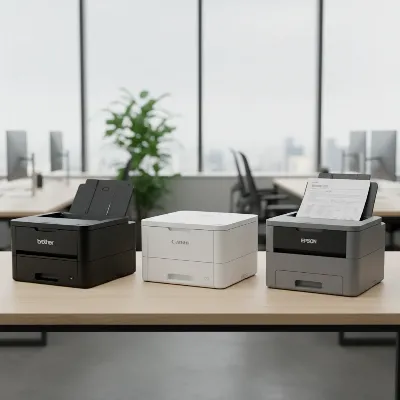 A lineup of various high-speed document scanner models from top brands, showing their compact design in a modern office setting.
Tips for Using and Maintaining Your Document Scanner
Investing in a high-speed document scanner is just the beginning. To maximize its lifespan and ensure consistent, high-quality performance, proper usage and maintenance are essential. Following these tips will help your small business get the most out of its digitization efforts.
Effective Scanning Practices
- Prepare Documents: Before feeding documents, remove staples, paper clips, sticky notes, and ensure pages are flat and free from tears. This prevents jams and damage to both the documents and the scanner.
- Use Correct Settings: Adjust DPI settings based on the document type. Use 200-300 DPI for searchable text, 600 DPI for important documents with images, and higher for photos. Select color, grayscale, or black & white appropriately to manage file size and quality.
- Utilize Software Features: Take full advantage of features like OCR for searchable PDFs, automatic blank page detection and removal, and auto-orientation. These features significantly speed up post-scanning processing.
- Batch Scanning: For optimal speed, use the ADF for batch scanning. Load a large stack of documents and let the scanner do its work, allowing you to focus on other tasks.
- Secure File Naming and Storage: Establish a consistent naming convention for scanned files and organize them into logical folders, preferably backed up to a cloud service or network drive, for easy retrieval and disaster recovery.
Cleaning and MaintenanceRegular cleaning is crucial for preventing common issues like paper jams, streaks on scans, and premature wear.
- Dust Regularly: Use a soft, lint-free cloth to wipe the exterior of the scanner. Dust can accumulate and interfere with optical sensors or paper paths.
- Clean Rollers: The paper feed rollers can accumulate paper dust and residue, leading to misfeeds and jams. Consult your scanner’s manual for specific instructions on cleaning the rollers, often using a damp, lint-free cloth or a specialized cleaning kit.
- Wipe Glass Surfaces: For scanners with a flatbed component or glass guides in the ADF, use a non-abrasive glass cleaner and a soft cloth to remove fingerprints and smudges that can cause streaks on scans.
- Software Updates: Keep your scanner’s drivers and software up to date. Manufacturers often release updates that improve performance, add new features, or fix bugs.
Troubleshooting Common Issues
- Paper Jams: Most modern scanners have easy-access panels to clear jams. Always clear jams gently, following the manufacturer’s guide, to avoid damaging internal components.
- Poor Scan Quality/Streaks: Often caused by dirty rollers or glass. A thorough cleaning usually resolves this. Also, ensure the document is placed correctly and not skewed.
- Connectivity Problems: Check all cables (USB, Ethernet) are securely connected. For Wi-Fi issues, try restarting the scanner, router, and computer, or reconfiguring the wireless settings.
- Software Glitches: Restart the scanning application or your computer. If problems persist, reinstalling the scanner software and drivers might be necessary.
> “Implementing high-speed document scanners is a major upgrade for small businesses. It not only accelerates daily operations but also creates a resilient digital archive, safeguarding critical information against physical damage or loss.” – Sarah Chen, Digital Workflow Consultant
Conclusion
For small businesses aiming to thrive in an increasingly digital world, investing in a high-speed document scanner is a strategic decision that delivers significant returns in efficiency, organization, and data security. By carefully considering your specific needs, understanding the various scanner types, and evaluating key features like speed, ADF capacity, and software, you can select a device that perfectly aligns with your operational demands. The top models available today, from the versatile Brother ADS-1800W to the ultra-fast Epson FastFoto FF-680W and specialized Epson RapidReceipt RR-600W, offer robust solutions to improve your paper-intensive tasks. Proper usage and consistent maintenance are crucial for maximizing your scanner’s lifespan and ensuring reliable performance. Empower your small business by embracing digital document management today—what impact could a streamlined, paperless workflow have on your business’s future?
Frequently Asked Questions
How to Choose a High-Speed Document Scanner
Selecting the best high-speed document scanner for your small business involves evaluating your specific needs against key features to enhance productivity.
Assess your typical scanning volume and document types. Consider if you digitize dozens of invoices daily or hundreds of multi-page contracts weekly to narrow down options. Small offices might prioritize a compact design, while heavy paperwork businesses need maximum throughput.
Prioritize scanners with speeds ranging from 30 PPM (60 IPM) to 80 PPM (160 IPM) for efficient high-volume tasks. PPM refers to single-sided sheets per minute, while IPM indicates total scanned sides per minute, often double the PPM for duplex scanners.
Look for an Automatic Document Feeder (ADF) capacity of 50-80 sheets for regular scanning needs to minimize interruptions. Ensure the scanner offers duplex scanning, which captures both sides of a document in a single pass, significantly reducing processing time for double-sided papers.
Choose between USB 2.0/3.0 for direct connection or Wi-Fi/Ethernet for network flexibility and shared access. Essential software features include Optical Character Recognition (OCR) for searchable text, automatic image enhancement, and cloud integration for efficient document management.
For small businesses, select compact models that offer good performance without occupying too much desk space; some scanners feature U-turn paper paths or can be folded. High-speed, feature-rich scanners typically range from $400 to $800, so balance cost with necessary features for a good return on investment.
Get our weekly buyer guide
Practical specs, not advice. Unsubscribe anytime.

I got one of these high-speed scanners for my home office, mainly for personal archiving and some freelance work. It’s fast, no doubt, but I found the initial setup for the Wi-Fi connectivity a bit finicky. Once it was connected, it worked fine, but it took a few tries. The scanning speed of 30 PPM is perfectly adequate for my needs, though.
I finally pulled the trigger on a high-speed document scanner with an ADF, and it’s been a game-changer for my small accounting firm. The 60 IPM duplex scanning is incredibly fast, and I’m no longer drowning in paper. It handles stacks of invoices and receipts without a hitch, making tax season prep so much smoother. Definitely worth the investment for anyone serious about digitizing their records.
Our small law practice needed something to handle a high volume of client files, and the recommendation for a scanner with 80+ PPM was spot on. This machine chews through documents, and the duplex scanning feature is a lifesaver. It’s really helped us streamline our operations and keep everything organized digitally. Highly recommend for any business with heavy scanning needs.
This scanner is a solid performer for my real estate office. The resolution is excellent for property deeds and contracts, and the OCR software is surprisingly accurate, which saves a ton of time. My only minor complaint is that the ADF capacity, while good, could be a little larger for those really big batches of documents. Still, it’s a huge upgrade from my old flatbed.