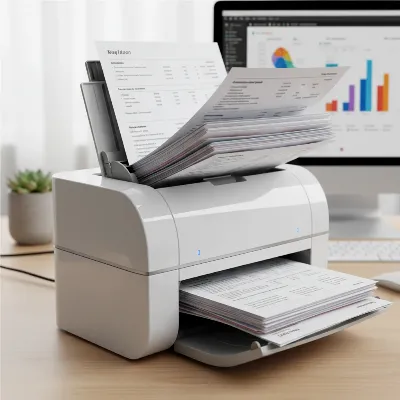
In an era striving for digital efficiency, the constant battle against accumulating paper documents and receipts remains a significant challenge for many businesses and individuals. Piles of invoices, expense reports, and vital records can quickly become overwhelming, hindering productivity and organizational flow. The Epson RapidReceipt RR-600W Desktop Scanner emerges as a powerful contender designed to tackle this very issue, offering a robust solution to transform physical clutter into organized, searchable digital assets. This comprehensive review delves into the capabilities, performance, and overall value of the RR-600W, helping you determine if this advanced document scanner is the right tool to streamline your workflow and accelerate your journey towards a paperless environment.
The Epson RapidReceipt RR-600W: A Deep Dive into its Features
The Epson RapidReceipt RR-600W is engineered with a suite of features that position it as a formidable asset for both financial management and general document digitization. Understanding its core components reveals why it has garnered attention as an Editors’ Choice selection for a midrange receipt scanner.
Core Scanning Capabilities
Table is empty.At its heart, the RR-600W boasts impressive speed and versatility. It is rated at 35 pages per minute (ppm) for single-sided documents and 70 images per minute (ipm) for two-sided (duplex) documents, with real-world tests often showing performance that meets or even slightly exceeds these specifications. This rapid scanning capability ensures that large batches of documents are processed quickly and efficiently. The Automatic Document Feeder (ADF) can hold up to 100 pages, allowing for substantial batch scanning without constant manual intervention.
The scanner supports a wide array of document types and sizes, from delicate receipts and business cards to standard A4 documents, and can even handle dog-eared or crumpled papers with surprising ease, thanks to its TrueFeed technology designed to minimize paper jams. Users can achieve high-quality digital reproductions with scanning resolutions up to 600 dpi, ensuring crisp, clear images of all scanned materials.
Connectivity & User Interface
Modern convenience is central to the RR-600W’s design. It offers flexible connectivity options, including Wi-Fi for wireless networking and a direct USB 3.0 connection for robust, high-speed data transfer. While wireless setup is generally stable, some users on complex mesh networks have noted occasional connectivity challenges; in such cases, the USB connection provides an unfailingly reliable alternative.
A prominent 4.3-inch color touchscreen enhances the user experience, providing intuitive control and the ability to perform PC-free scanning. This means documents can be scanned directly to various destinations such as USB thumb drives, email addresses, or popular cloud services, offering unparalleled flexibility for sharing and storage without needing to be tethered to a computer.
ScanSmart Accounting Edition Software
A significant differentiator for the RR-600W is its bundled ScanSmart Accounting Edition software, featuring advanced AI PRO receipt management. This intelligent software is designed to streamline the often tedious process of financial record-keeping by automatically extracting and categorizing key data from receipts, invoices, and expense reports. It can then seamlessly integrate this data with popular accounting tools like QuickBooks, TurboTax, and Excel, greatly reducing manual data entry. The software also offers highly accurate Optical Character Recognition (OCR), transforming scanned documents into searchable PDFs, image PDFs, JPEGs, TIFFs, multi-TIFFs, and even PDF/A formats, enhancing document accessibility and archival capabilities.
Performance & User Experience: What to Expect
Beyond its specifications, the true measure of a scanner lies in its real-world performance and how it impacts the user’s daily workflow. The RR-600W generally delivers a positive and productive experience for those seeking efficient document digitization.
Speed and Accuracy in Practice
In practical use, the Epson RR-600W lives up to its promise of speed without sacrificing accuracy. It consistently performs at or above its rated speeds, making quick work of even large scanning jobs. The high-quality optics combined with Epson’s processing ensure that text and images are captured with remarkable clarity. Furthermore, the OCR capabilities of the ScanSmart software are highly accurate, converting scanned text into editable and searchable data with minimal errors, though like any AI, occasional manual verification might be necessary for critical financial data.
Managing Receipts and Documents with Ease
The integration of the ScanSmart Accounting Edition software is where the RR-600W truly shines for financial management. Small business owners, accountants, and individuals can significantly reduce the time spent on expense tracking and bookkeeping. The automated data extraction intelligently identifies crucial information such as vendor, date, and amount, categorizing it for easy export and reconciliation. This transforms what was once a laborious task into a swift, semi-automated process, freeing up valuable time and reducing the potential for human error.
> “The Epson RR-600W desktop receipt and document scanner is fast and accurate, and the bundled ScanSmart Accounting Edition application makes short work of scanning and categorizing financial data gleaned from receipts, invoices, and expense reports.”
Build Quality and Design
Epson has engineered the RR-600W with a focus on durability and functionality. The robust construction utilizes durable plastics and features well-engineered paper paths that contribute to its jam-free performance. While the unit is compact enough for most desktop environments, it is somewhat bulkier than simpler receipt scanners, a trade-off for its advanced capabilities and 100-page ADF. Its sleek and professional design ensures it looks appropriate in any office setting. The touchscreen is responsive and solidly integrated, adding to the overall premium feel and user-friendly operation of the device. Epson’s reputation for reliability in office equipment suggests that this scanner is built to deliver consistent performance over years of moderate to heavy use.
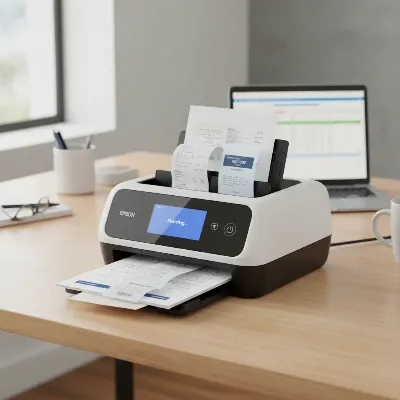 Epson RapidReceipt RR-600W desktop scanner actively digitizing a stack of mixed documents and receipts in a modern office setting.
Epson RR-600W in the Market: Value and Alternatives
When considering the Epson RapidReceipt RR-600W, it’s essential to weigh its features and performance against its cost and available alternatives in the market.
Is the RR-600W Worth the Investment?
The Epson RapidReceipt RR-600W is positioned as a premium desktop receipt scanner, and its price reflects its advanced features, particularly the AI-powered software and substantial feeder capacity. For users who frequently process hundreds of receipts or invoices monthly, the significant time savings and organizational benefits easily justify the investment. Small businesses, accountants, and busy professionals will find its specialized capabilities to be a highly valuable asset. However, for casual users or those with minimal scanning needs, this model might be more scanner than necessary, and more affordable, simpler alternatives exist that could adequately meet their requirements. The inclusion and power of the ScanSmart AI PRO software and the hardware’s reliability significantly enhance its appeal.
Comparing with Competitors
The RR-600W stands out in its category due to its potent combination of duplex scanning speed, a high-capacity automatic document feeder, and intelligent data extraction software. While some cheaper models can scan receipts, they often lack the crucial duplex scanning capability, the high feeder capacity, or the advanced AI software for data management. On the other end of the spectrum, some high-end general Document Scanners from competitors might offer even faster speeds or broader document compatibility, but they typically come at significantly higher price points and often lack the specialized receipt management features tailored for financial workflows that the Epson offers. Competitors like the Brother DS-940DW offer competitive scanning speeds and software integration, sometimes at a lower price point, but they may not match Epson’s AI receipt management capabilities or the large feeder capacity, making trade-offs dependent on specific user needs. Epson’s offering effectively strikes a balance, targeting small to medium business users who require both robust hardware and software specifically designed for efficient receipt and document processing.
Maximizing Your RR-600W: Tips for Optimal Use and Maintenance
To fully leverage the capabilities of your Epson RapidReceipt RR-600W and ensure its longevity, adopting a few best practices for use and maintenance is crucial.
Best Practices for Scanning
Always ensure documents are properly loaded into the ADF, neatly stacked and aligned to prevent skewing and misfeeds. The TrueFeed technology is excellent for handling varied document types and sizes, but a little preparation goes a long way. When scanning sensitive or fragile items, consider using a protective carrier sheet if available, although the RR-600W is designed to be gentle with various paper types. Leverage the touchscreen interface for quick, direct scanning tasks, especially when you need to send documents to a USB drive or cloud service without involving a computer.
Software Optimization
Regularly check for and install updates for the Epson ScanSmart Accounting Edition software. Software updates often include performance improvements, enhanced OCR accuracy, and new features or integrations that can further streamline your workflow. Familiarize yourself with all the data export options within ScanSmart to ensure you are integrating seamlessly with your preferred accounting software or spreadsheet applications, maximizing the value of the AI-driven data extraction. Taking the time to customize categorization rules within the software can also significantly improve efficiency over time.
Maintenance for Longevity
Like any precision electronic device, regular maintenance will extend the life and maintain the performance of your RR-600W. Periodically clean the scanner’s rollers and the scanning glass using a soft, lint-free cloth, as dust and paper residue can accumulate and affect scan quality or paper feeding. Refer to the user manual for specific cleaning instructions and recommended cleaning solutions. Additionally, keep an eye out for firmware updates from Epson, as these can improve the scanner’s functionality, connectivity, and overall stability. Proper care ensures your investment continues to deliver reliable, high-quality scanning for years to come.
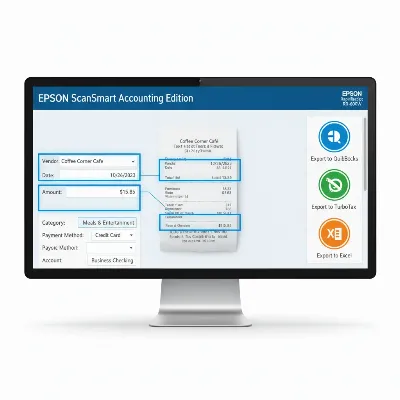 Epson RapidReceipt RR-600W scanner's ScanSmart software interface displaying categorized receipt data and export options on a computer screen.
Conclusion
The Epson RapidReceipt RR-600W Desktop Scanner stands out as an exceptional tool for anyone overwhelmed by physical paperwork and seeking an efficient digital transformation. Its impressive scanning speed, high-capacity automatic document feeder, and robust build quality provide a solid hardware foundation. However, it’s the intelligent ScanSmart Accounting Edition software, with its AI-powered receipt management and seamless integration with financial tools, that truly elevates the RR-600W, making it an invaluable asset for streamlining financial workflows and general document organization.
While it represents a premium investment, its capabilities in terms of speed, accuracy, and smart data extraction justify the cost for businesses and individuals who handle substantial volumes of documents and receipts. The RR-600W is more than just a scanner; it’s a comprehensive solution designed to convert paper chaos into organized, searchable, and manageable digital information, ultimately boosting productivity and reducing administrative burdens. If you’re ready to transform your paper piles into productive digital assets, the Epson RapidReceipt RR-600W offers a compelling pathway forward.
Frequently Asked Questions
Can the Epson RapidReceipt RR-600W scan plastic cards like credit cards?
No, while the scanner has an icon that resembles a credit card on its feeder, it is not designed to scan plastic cards. However, it excels at scanning paper business cards and other similar-sized documents.
Does the RR-600W require a PC connection for all scanning operations?
No, the Epson RR-600W features a 4.3-inch touchscreen that allows for standalone operation. You can scan documents directly to a USB thumb drive, email, or various cloud services without needing to be connected to a computer.
What accounting software does the ScanSmart AI PRO integrate with?
The ScanSmart Accounting Edition software, included with the RR-600W, is designed to integrate seamlessly with popular financial management tools such as QuickBooks, TurboTax, and Microsoft Excel, facilitating easy data export and categorization.
How reliable is the Wi-Fi connectivity on the Epson RR-600W?
The Wi-Fi connectivity is generally stable and reliable for most users. However, some reports indicate that it may occasionally struggle to connect or remain connected on complex dual-band or mesh Wi-Fi networks. For guaranteed stable connectivity, a direct USB connection is always an option.
Is the Epson RR-600W suitable for home use, or is it strictly for business?
While it offers advanced features ideal for businesses and accountants, the RR-600W is also highly suitable for home users with significant document and receipt scanning needs. Its efficiency can greatly benefit anyone looking to digitize household records and manage personal finances.