In today’s fast-paced world, paper documents can quickly become a source of clutter and inefficiency, whether you’re managing a bustling home office or a growing small business. The task of digitizing important files, receipts, and contracts often feels daunting, leading to overflowing desks and lost information. Imagine reclaiming your workspace and having every crucial document instantly accessible with a tap. The Brother ADS-1700W Compact Document Scanner aims to be that solution, offering a blend of space-saving design, swift performance, and versatile connectivity. This review will delve into its capabilities, evaluating how well it serves the modern user by dissecting its features, performance, and overall value.
Why Choose a Compact Document Scanner?
The digital age promised a paperless future, yet many of us still grapple with physical documents. This is where a compact document scanner becomes invaluable. Unlike cumbersome flatbed scanners, which are ideal for delicate items or books but notoriously slow for multi-page jobs, compact ADF (Automatic Document Feeder) scanners are built for speed and efficiency. They are designed to quickly process stacks of paper, transforming them into digital files. For home offices and small businesses, where space is often at a premium, a compact model like the ADS-1700W offers the crucial advantage of a minimal footprint without sacrificing core functionality. It bridges the gap between basic, slow scanning methods and the large, expensive, high-volume machines typically found in corporate environments, providing an efficient tool that fits neatly into almost any setup.
Brother ADS-1700W: Features at a Glance
The Brother ADS-1700W is engineered to streamline your document management. Its design prioritizes efficiency and ease of use in a remarkably small package.
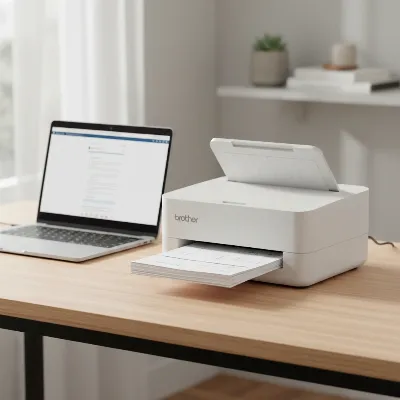 Brother ADS-1700W Compact Document Scanner on a modern desk setup with a laptop and a few documents, showcasing its small footprint and sleek design.
The scanner’s design is notably sleek and compact, allowing it to fit into virtually any workspace. Its Automatic Document Feeder (ADF) smartly folds over the unit when not in use, protecting its internals and further reducing its footprint. A dedicated slot for plastic cards simplifies the digitization of IDs, business cards, and other rigid media.
Performance-wise, the ADS-1700W is a workhorse for its size. It boasts impressive scanning speeds of up to 25 pages per minute (ppm) for single-sided documents and 50 images per minute (ipm) for duplex (double-sided) scanning, whether in color or monochrome, at a standard 300 dpi resolution. The 20-sheet ADF capacity ensures you can process small to medium stacks without constant supervision. With an optical resolution of 600 x 600 dpi (and interpolated resolution up to 1200 x 1200 dpi), it captures clear and legible documents, making it suitable for a wide range of needs, from basic archiving to detailed text recognition. Brother rates this model with a daily duty cycle of up to 1000 scans, underscoring its reliability for regular use.
Connectivity is a strong suit for the ADS-1700W. It features built-in Wireless 802.11 b/g/n, enabling seamless integration into your existing network and allowing for wireless scanning from PCs and mobile devices. A Micro USB 3.0 port facilitates high-speed wired connection to a computer or direct scanning to a USB flash memory drive. The inclusion of Wi-Fi Direct provides a flexible connection option even without a router.
The user experience is significantly enhanced by its 2.8-inch color Touchscreen LCD. This intuitive display allows for direct control over scanning functions, including programmable one-touch shortcuts for frequently used settings or destinations. The “Auto Start Scan” feature adds another layer of convenience, automatically initiating a scan as soon as documents are placed in the feeder. This scanner offers exceptional versatility in where your scans can go, supporting multiple “Scan-to” destinations such as File, Image, OCR, Email, Network folders, FTP, various Cloud services (including Dropbox, Google Drive, and OneDrive), Mobile Devices via the iPrint&Scan app, and even directly to a USB flash memory drive.
Complementing the hardware, the Brother ADS-1700W comes with a robust software bundle. This typically includes the Brother iPrint&Scan app, along with document management and Optical Character Recognition (OCR) software like PaperPort. These tools enable you to organize, edit, and create searchable PDF files, turning scanned images into editable text.
Key Advantages of the ADS-1700W
The Brother ADS-1700W stands out for several compelling reasons that make it an attractive option for many users:
- Space-Saving Design: Its compact size and folding ADF make it one of the most desk-friendly document scanners available, ideal for tight spaces.
- Fast Duplex Scanning: The ability to scan both sides of a document in a single pass at up to 50 ipm drastically cuts down scanning time, boosting productivity.
- Intuitive Touchscreen and Customizable Workflows: The color LCD touchscreen simplifies operations, allowing users to create and access one-touch shortcuts for their most common scanning tasks.
- Broad Connectivity Options: With Wi-Fi, Wi-Fi Direct, and USB 3.0, the scanner offers flexible ways to connect to various devices and networks.
- Handles Diverse Document Types: From standard paper and long documents (up to 34 inches) to fragile receipts and rigid plastic cards, the ADS-1700W can digitize a wide array of media.
- Solid Daily Duty Cycle: Rated for up to 1000 scans per day, it can reliably handle the needs of a busy home or small office.
- Accurate OCR: Its Optical Character Recognition capabilities are robust, converting scanned documents into searchable and editable text with high accuracy.
Considerations and Limitations
While the Brother ADS-1700W offers many benefits, it’s important to be aware of its limitations to ensure it aligns with your specific needs:
- Lack of a Built-in Battery: Despite its compact designation, the ADS-1700W is not truly portable in the sense of being battery-powered. It requires an AC adapter for operation, which limits its use to locations with a power outlet.
- Heavier than Some “Portable” Rivals: At approximately 3.7 pounds (1.41 kg), it’s heavier than some of its ultra-portable competitors, which might be a factor for users who frequently carry their scanner.
- No Dedicated Output Tray: Scanned documents simply eject onto the desk in front of the scanner, meaning you need to ensure sufficient clear space to catch them.
- USB Cable Not Included: While it has a Micro USB 3.0 port for PC connection, Brother does not typically include the corresponding cable in the box, requiring a separate purchase for wired connectivity.
- Software Setup Can Be Challenging: Some users have reported initial frustrations with setting up the software, particularly for wireless connections.
- Cloud Integration Creates Default Folders: When scanning directly to cloud services, the scanner often creates a default “Brother” folder, and you might not be able to select an existing folder directly from the device.
- Small Touchscreen Buttons: A few users find some of the on-screen touch buttons to be too small for comfortable finger navigation.
Brother ADS-1700W vs. Other Document Scanner Types
To help you decide if the Brother ADS-1700W is the right fit, here’s a simplified comparison with other common document scanner types:
| Feature | Brother ADS-1700W (Compact ADF) | Flatbed Scanner | Large Office ADF Scanner |
|---|---|---|---|
| Primary Use | Multi-page documents, receipts, cards in compact spaces | Books, fragile items, thick objects, single pages | High-volume, rapid multi-page scanning |
| Speed (ADF) | Up to 25 ppm / 50 ipm | N/A (manual placement per page) | 50+ ppm / 100+ ipm (often much higher) |
| Duplex Scanning | Yes (single pass) | No (requires manual flip) | Yes (single pass) |
| Footprint | Small | Large | Large |
| Portability | Compact, but needs external AC power | None (designed for stationary use) | None (designed for stationary use) |
| Battery Option | No | N/A | N/A |
| Document Versatility | Standard paper, long documents, receipts, plastic cards | Books, magazines, photos, delicate items, odd shapes | High-volume paper documents, some specialty media |
| Price Range | Mid-range | Low to Mid | High (significant investment) |
Who is the Brother ADS-1700W For?
The Brother ADS-1700W shines in specific environments and for particular user profiles. It is an excellent choice for:
- Home Office Users: Individuals looking to declutter their home office and efficiently digitize household documents, bills, and personal records. Its compact size ensures it doesn’t dominate a small desk.
- Small Businesses and Startups: Organizations with moderate daily scanning needs that require a reliable, fast, and feature-rich scanner without the bulk or cost of a full-sized departmental machine.
- Mobile Professionals (with power access): Business travelers or field agents who need to digitize documents on location, provided they have access to an AC power outlet. Its compact form makes it easy to pack, even if it lacks a battery.
- Users Valuing Wireless Connectivity and Touchscreen Control: Anyone who appreciates the convenience of scanning directly to cloud services, mobile devices, or network folders, controlled effortlessly via an intuitive touchscreen interface.
- Those Handling Diverse Document Types: If your scanning needs include a mix of standard papers, receipts, and plastic cards, the ADS-1700W’s versatility with its dedicated card slot and robust ADF will be highly beneficial.
Tips for Maximizing Your ADS-1700W Experience
To get the most out of your Brother ADS-1700W Compact Document Scanner, consider these practical tips:
- Regular Cleaning is Key: Dust and paper fibers can accumulate on the rollers and scanning windows, affecting scan quality and potentially causing jams. Regularly clean these components with a soft, lint-free cloth or the cleaning sheet provided by Brother.
- Utilize One-Touch Shortcuts: The 2.8-inch touchscreen allows you to program up to 20 customizable shortcuts. Take advantage of this feature to create one-touch commands for frequent scanning tasks, such as “Scan to Receipts Folder” or “Scan to Cloud – PDF,” saving you valuable time.
- Ensure Proper Paper Alignment: To prevent paper jams and skewed scans, always fan your documents before loading them into the Automatic Document Feeder, and adjust the paper guides snugly to the width of your stack.
- Keep Software and Drivers Updated: Visit Brother’s official support website regularly to download the latest drivers and software updates. Updated software often improves performance, adds new features, and resolves compatibility issues.
- Explore Different Scan-to Destinations: Experiment with scanning directly to various destinations like email, network folders, USB drives, or different cloud services. Understanding the optimal destination for each type of document can significantly streamline your workflow.
- Leverage Image Optimization Features: The scanner includes features like automatic color detection/adjustment, image rotation, bleed-through/background removal, and text enhancement. These can dramatically improve the quality and readability of your digitized documents.
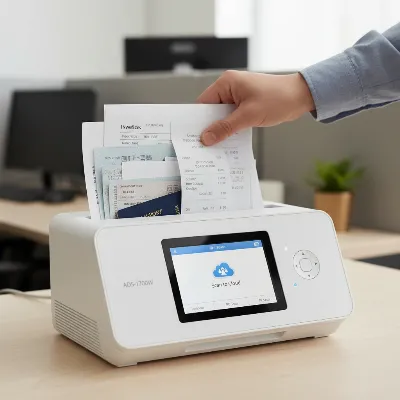 A hand placing documents into the Brother ADS-1700W Compact Document Scanner's ADF, with the touchscreen showing a "Scan to Cloud" option, illustrating efficient workflow.
Conclusion
The Brother ADS-1700W Compact Document Scanner emerges as a highly capable and intelligent device for anyone seeking to bring order to their paper-filled world. Its compact form factor, swift duplex scanning, and intuitive color touchscreen combine to deliver an efficient digitizing experience. While its lack of a built-in battery might temper expectations of true “on-the-go” portability, it excels as a compact desktop solution with extensive wireless capabilities. For home offices and small businesses prioritizing space-saving design, robust features, and versatile connectivity, the ADS-1700W offers compelling value. It reliably handles a variety of documents, making it an excellent investment for enhancing productivity and achieving a more organized, digital workflow. Could the ADS-1700W be the final piece in your journey to a more streamlined and clutter-free workspace?
Frequently Asked Questions
Is the Brother ADS-1700W truly portable?
While compact and easily moved, the Brother ADS-1700W is not truly portable in the sense of being battery-powered. It requires an AC adapter to operate, meaning it needs to be plugged into a power outlet during use.
Can the Brother ADS-1700W scan photos?
Yes, the ADS-1700W can scan photos. It features a good optical resolution of 600 x 600 dpi, making it suitable for digitizing photographs, though for very high-quality photo archiving, a dedicated photo scanner or flatbed might offer superior results.
What software is included with the ADS-1700W?
The scanner typically comes bundled with Brother’s iPrint&Scan application, alongside document management and Optical Character Recognition (OCR) software such as PaperPort. These tools assist with organizing, editing, and creating searchable PDF files from your scans.
Does the ADS-1700W work with Mac and Linux operating systems?
Yes, the Brother ADS-1700W is compatible with Windows, Mac, and Linux environments. It supports standard drivers like TWAIN, WIA, ICA, and SANE, ensuring broad compatibility across different platforms.
How do I connect the Brother ADS-1700W wirelessly?
You can connect the ADS-1700W wirelessly via Wi-Fi to your existing network. It also supports Wi-Fi Direct, allowing for a direct wireless connection between the scanner and a mobile device or computer without needing a router. Setup is typically managed through the scanner’s touchscreen or the iPrint&Scan app.
Can the Brother ADS-1700W scan business cards?
Absolutely. The ADS-1700W features a dedicated card slot designed specifically for scanning plastic cards, business cards, and other rigid media quickly and easily, ensuring accurate digitization of contact information and other data.
What types of cloud services does the ADS-1700W support for direct scanning?
The Brother ADS-1700W supports direct scanning to several popular cloud services, including Dropbox, Google Drive, and OneDrive. This allows you to digitize documents and upload them straight to your preferred cloud storage without needing an intermediary computer.