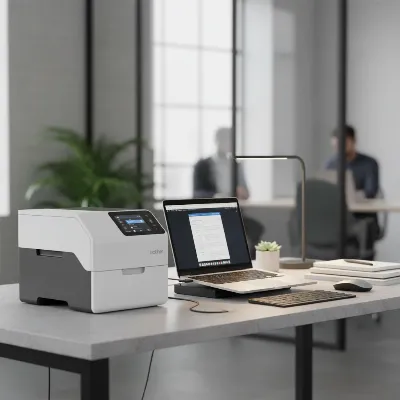
Document scanners are invaluable tools for digitalizing paperwork, streamlining workflows, and reducing clutter. Yet, over time, dust, paper fibers, and ink residue can accumulate on the crucial pick-up and feed rollers. This buildup can lead to frustrating issues such as paper jams, misfeeds, and unsightly streaks or lines on your scanned documents. Fortunately, maintaining these components is a straightforward task you can handle yourself with the right approach and a few common items. This guide will walk you through the process of cleaning your document scanner rollers safely and effectively, ensuring your device continues to operate at peak performance.
Why Clean Your Document Scanner Rollers?
Table is empty.The rollers within your document scanner are the unsung heroes of its operation, responsible for grabbing and guiding each page through the scanning mechanism. When these rubberized rollers become dirty or slick with residue, their ability to grip paper diminishes significantly. This directly impacts the quality of your scans, often resulting in distorted images, skewed pages, or mysterious lines appearing on your digital files. Dirty rollers are also a primary culprit behind frustrating paper jams and multi-feeds, where several pages are pulled through at once. Regular cleaning prevents these common problems, ensuring smooth operation and preserving the integrity of your scanned documents. It’s an essential step in extending the overall lifespan of your valuable scanning equipment and maintaining consistent performance.
Essential Tools for Roller Cleaning
Before you begin the cleaning process, gathering the correct tools will ensure a smooth and safe experience. Using the wrong materials can potentially damage your scanner, so it’s vital to have the right kit on hand.
Here’s what you’ll need:
- Lint-free cloths: Microfiber cloths are ideal as they effectively pick up dust and debris without shedding fibers. Avoid paper towels or rough fabrics that could scratch surfaces or leave behind lint.
- Clean water: Distilled water is often recommended to prevent mineral deposits, though clean tap water is usually sufficient.
- Isopropyl alcohol (IPA): While plain water is generally safe and effective, some manufacturers, like HP, suggest using isopropyl alcohol for specific rollers, particularly lower feed rollers, to tackle stubborn grime. Always consult your scanner’s user manual before using IPA, as it can damage certain rubber compounds.
- Cotton swabs: These are excellent for reaching into tight spaces and cleaning smaller, intricate roller sections that larger cloths can’t access.
- Your scanner’s user manual: This is your most important tool. It provides model-specific instructions for opening the scanner, accessing rollers, and any particular cleaning agent recommendations or warnings.
Using the recommended tools ensures a thorough cleaning without inadvertently causing damage.
Step-by-Step Guide to Cleaning Your Scanner Rollers
Cleaning your scanner rollers is a meticulous process that, when done correctly, can dramatically improve your device’s reliability. Follow these steps carefully to ensure a safe and effective cleaning.
1. Preparation is Key
Before touching any internal components, proper preparation is paramount to prevent electrical hazards and potential damage. First, always turn off your document scanner and unplug it from the power outlet. This crucial step eliminates any risk of electric shock. Next, disconnect all other cables, such as USB or network connections, to ensure the device is completely isolated. If your scanner has been in continuous use, allow it a few minutes to cool down, as internal components can sometimes retain heat.
2. Accessing the Rollers
The method for accessing your scanner’s rollers can vary significantly between models. This is where your scanner’s user manual becomes indispensable. Typically, you’ll need to open the document feeder or a specific scanner cover to expose the internal paper path and rollers. Look for latches, levers, or release buttons that allow access. Some advanced models may even have removable roller units, simplifying the cleaning process considerably. If your manual outlines how to remove rollers, carefully follow those instructions.
3. The Cleaning Process
With the rollers exposed, it’s time for the actual cleaning. Slightly dampen a lint-free cloth with clean water. It is critical that the cloth is only moist, not saturated, to prevent liquid from dripping into the scanner’s delicate electronics. Wring out any excess liquid thoroughly. Then, gently wipe each roller. If the rollers are accessible and can be manually turned without force, rotate them a full 360 degrees to ensure you clean the entire surface. For smaller, harder-to-reach rollers or intricate areas, use a cotton swab dampened with water. Remember the golden rule: never spray water or any cleaning solution directly onto the rollers or into the scanner’s interior. This could lead to serious electrical damage or leave residues that impair roller function. If your manual permits and you encounter very stubborn grime on specific rollers, you may use a cloth very lightly moistened with isopropyl alcohol, but only for those designated parts.
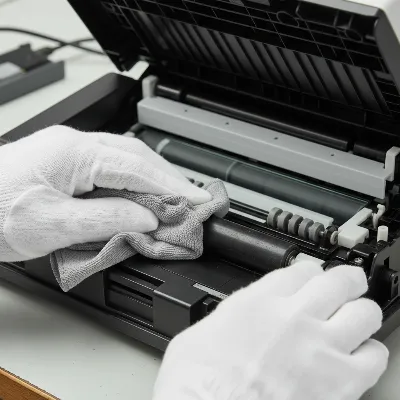 A person carefully cleaning document scanner rollers with a lint-free cloth and water
4. Drying and Reassembly
After cleaning, allow all rollers to air dry completely before reassembling your scanner. This usually takes only a few minutes, but patience is key to prevent moisture from causing issues. Once dry, if you removed any rollers or covers, carefully reinstall them according to your user manual’s instructions. Ensure all latches and covers are securely closed, listening for any clicks that indicate proper locking. Improper reassembly can lead to paper path issues or component damage.
5. Final Check
Once the scanner is fully reassembled and dry, reconnect the power cable and turn the device back on. Perform a few test scans using a blank sheet of paper or a less critical document. Observe the feeding process for any signs of hesitation or misalignment, and check the scanned images for streaks or smudges. This final check confirms that your cleaning efforts have been successful and your scanner is ready for regular use.
What to Avoid During Roller Cleaning
While cleaning your scanner rollers is a beneficial maintenance task, several practices should be strictly avoided to prevent damage to your device. Using the wrong products or techniques can cause more harm than good, potentially leading to costly repairs or even rendering your scanner unusable.
- Harsh Chemicals and Abrasive Cleaners: Never use solvents, ammonia-based cleaners, window cleaner (unless specifically formulated for scanner glass and not rollers), or any abrasive cleaning agents. These can degrade the rubber on the rollers, causing them to lose their grip, crack, or become sticky. They can also strip away protective coatings or damage plastic components.
- Spraying Liquids Directly: As mentioned, direct spraying can introduce moisture into the scanner’s delicate electronics, leading to short circuits or corrosion. Always apply cleaning solutions to a cloth first, then wipe.
- Over-Saturating Cloths: Even with water or manufacturer-approved solutions, a cloth that is too wet can leave excessive moisture behind, risking internal damage. Always wring out cloths thoroughly until they are just damp.
- Forcing Rotation of Non-Rotatable Rollers: Some rollers, particularly in the lower part of certain scanners, are not designed to be turned manually. Forcing them can damage the internal mechanisms and lead to permanent feeding errors. If a roller doesn’t turn easily, simply wipe the exposed surface.
- Using Compressed Air on Delicate ADF Components: While compressed air can be useful for blowing out loose dust from less sensitive areas, it can sometimes force debris deeper into delicate mechanisms or damage sensitive sensors within the Automatic Document Feeder (ADF). Use it sparingly and with caution, or opt for a soft brush instead.
Adhering to these warnings will help preserve your scanner’s functionality and longevity.
When to Clean Your Scanner Rollers
Establishing a regular cleaning schedule for your document scanner rollers is a proactive approach to maintenance that can prevent many common issues. For optimal performance, a general recommendation is to clean the document feed rollers once a month. However, the frequency can depend heavily on your usage patterns and environment. If your scanner is used heavily, in a dusty office, or frequently processes old or dusty documents, you might need to clean the rollers more often.
Beyond a scheduled routine, your scanner will often provide clear signals that its rollers need attention:
- Streaks or lines on scanned images: This is a classic indicator that debris is clinging to the rollers or scanning glass.
- Frequent paper jams: If documents are consistently getting stuck, especially at the start of the feed, dirty rollers are a likely cause.
- Documents feeding unevenly or skewed: When pages aren’t pulled straight through, it suggests the rollers aren’t gripping uniformly across the document’s width.
- Multiple pages feeding at once (multi-feeds): This happens when the rollers lose their ability to separate individual sheets effectively.
- Unusual noises during scanning: Sometimes, grinding or slipping sounds can indicate rollers struggling to grip.
By paying attention to these signs and maintaining a regular cleaning schedule, you can ensure your document scanner remains a reliable workhorse.
Conclusion
Maintaining clean document scanner rollers is a simple yet vital task that significantly impacts your scanner’s performance and lifespan. Regularly cleaning these often-overlooked components prevents common issues like paper jams, skewed documents, and poor scan quality, ensuring your digital archiving process remains smooth and efficient. While the process may seem daunting at first, it largely involves simple steps: powering down, carefully accessing the rollers, gently wiping them with a damp, lint-free cloth, and allowing them to dry thoroughly before reassembly.
Remember to always consult your scanner’s user manual for model-specific instructions and warnings, as recommendations for cleaning agents or roller access can vary. Avoiding harsh chemicals, direct spraying, and forcing components will protect your device from inadvertent damage. By incorporating roller cleaning into your routine scanner maintenance, you’re not just preventing problems; you’re actively preserving the accuracy and longevity of your valuable equipment. Consistent care ensures your scanner continues to be a reliable partner in your digital transformation journey.
Do you regularly clean your document scanner rollers, or are you just starting to think about it?
Câu Hỏi Thường Gặp
Can I use rubbing alcohol on all document scanner rollers?
No, not all document scanner rollers are suitable for cleaning with rubbing alcohol. While some manufacturers, like HP for certain models’ lower feed rollers, may approve its use, others, such as Xerox, explicitly caution against it. Always refer to your specific scanner’s user manual to confirm if isopropyl alcohol is safe for your model’s rollers, as it can damage certain rubber compounds.
How often should I clean my document scanner rollers?
For optimal performance and to prevent issues like paper jams and poor scan quality, it’s generally recommended to clean your Document Scanner rollers at least once a month. However, if you use your scanner heavily, operate it in a dusty environment, or frequently scan older or heavily used documents, you may need to clean the rollers more often to maintain efficiency.
What should I do if cleaning the rollers doesn’t fix my scanner’s issues?
If cleaning the rollers doesn’t resolve problems like persistent paper jams, streaks on scans, or misfeeds, it might indicate a more significant issue. The rollers could be worn out and require replacement, or there might be damage to other internal components like the separation pad or scanning glass. In such cases, consult your scanner’s user manual for troubleshooting or consider contacting the manufacturer’s support for professional assistance or replacement parts.